
How do you keep control of the invoice processing procedures within your organisation? Data provides insight and control over your processes, allowing you to further optimise them. The standard Blue10 Power BI reports offer you these valuable insights based on data from your Blue10 environment.
For example, you can see at a glance whether there is an imbalance in supplier dependency within your organisation, which suppliers you receive a relatively large number of credit notes from, and which invoices may have been processed twice in your administration.
The standard Blue10 Power BI reports have recently been improved and can now be downloaded separately. In this blog, we will discuss the updated reports in detail and how you can start using them.
Please note: The standard Blue10 PowerBI reports are available within the Enterprise subscription.
What’s new
- The reports can now be downloaded separately, with the idea that you can choose which departments or individuals within your organisation you share your reports with. This ensures that confidential invoices remain visible only to the authorised persons.
- The layout and user-friendliness have been modified. The overview pages of the reports feature fixed period filters. This allows you to quickly see whether an improvement has had an effect over the past three years, one year, the last 90 days or the last 30 days.
- In addition to an overview page, the reports also have in-depth pages with interactive options. Here you can filter on various components as desired, such as the period, administration, supplier or user.
- We now use the Odata API to securely retrieve current data from your Blue10 environment and display it in Power BI. You activate a report once with an access key provided by Blue10.
Three different reports
In this blog, we will briefly discuss the different reports. If you would like to know more about a specific report, click on the links to go to the in-depth blogs.
The supplier report
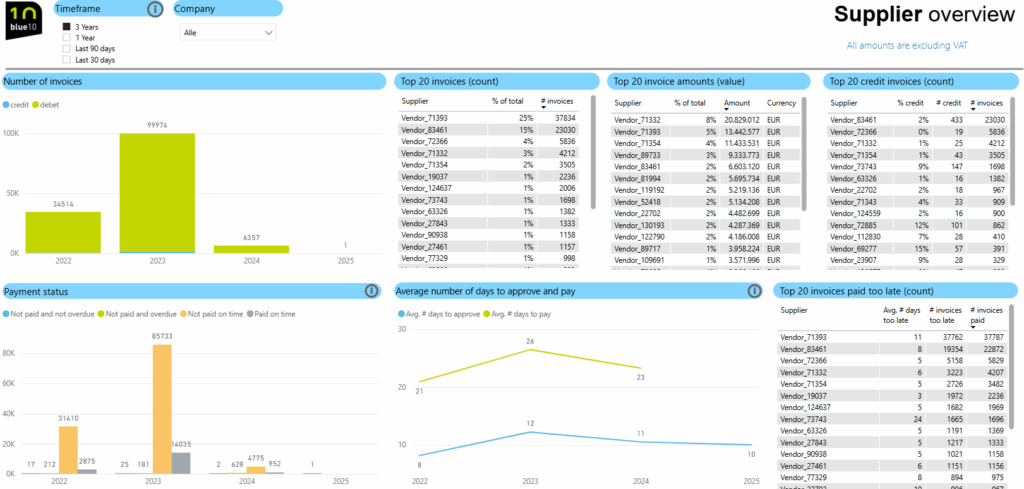
The supplier report provides insight into your organisation’s relationship with its suppliers. This report can offer added value when conducting a periodic supplier assessment.
Among other things, you will gain insight into:
- A possible (excessive) dependence on one or more suppliers.
- Which suppliers send a relatively large number of credit notes, for example because there are many errors.
- The internal approval and payment behaviour per supplier. Are invoices from a particular supplier often paid late or does approval take a long time?
The supplier report is structured in three different pages. The overview page works with fixed period filters (three years, one year, last 90 days and last 30 days). This gives you a quick insight into a longer period and allows you to see whether a change in the process in a recent period has led to an improvement. In addition to the overview page, there is also an in-depth page where you, can select a time unit and/or filter by a specific supplier.
Finally, the comparison page allows you to compare suppliers, for example if you have two suppliers providing the same type of service.
Want to know more about the supplier report? Read more here.
The purchase order report
This report provides insight into the process surrounding the processing and matching of purchase orders. If your organisation works with purchase orders, this report provides more in-depth information and can, for example, be shared with the purchasing department so that they can see the performance of each supplier or purchaser for themselves.
The purchase order report consists of an overview page and an in-depth page. Here you will find, among other things, the matching percentage per supplier, whether or not combined per purchaser. For example, you can see suppliers with a low matching percentage, so that targeted improvements can be made.
On the in-depth page, it is also possible to explore a specific supplier in combination with purchase orders.
Want to know more about the purchase order report? Read more here.

Process management & auditing report
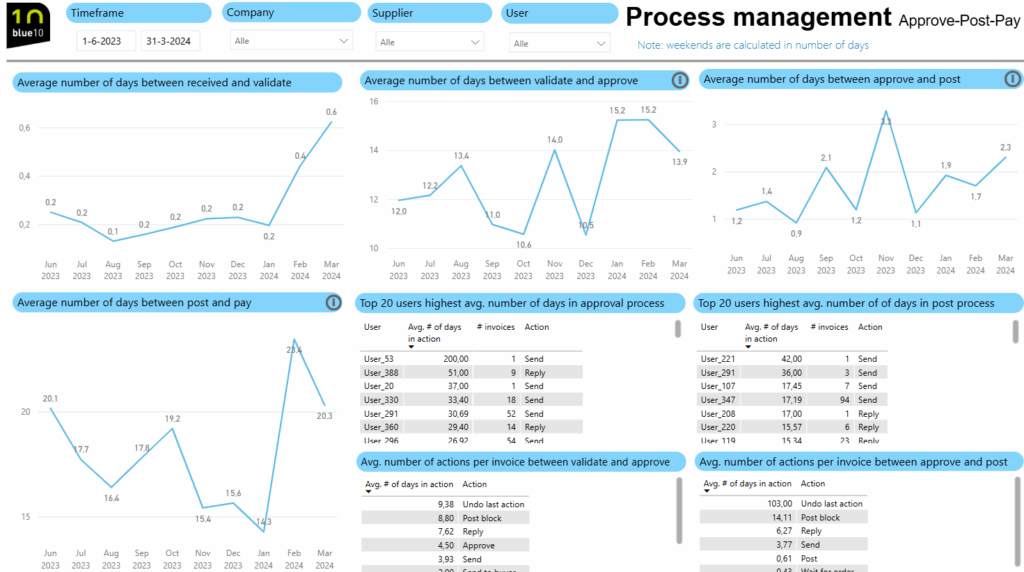
The process management & auditing report gives you more insight into the managing process in Blue10 and offers support during audits of the purchasing process. Among other things, you can see duplicate invoices, changed users and how much time is needed on average to process an invoice. With these insights, you can monitor your processes and make targeted adjustments where necessary.
The process processing & auditing report consists of several pages:
- Processing info. Here you will find information about the duration of each step in your process. This page provides insight into any bottlenecks in the process, allowing you to zoom in on a specific user or supplier.
- Auditing invoices & suppliers. Here you can see whether invoices have been changed or removed from Blue10 after booking. It also indicates whether there are any unusual invoice amounts compared to the average invoice amount for that supplier. Based on these insights, you as a user of the report can determine whether the changes are justified and, for example, check whether they have also been implemented in the accounting system.
- Duplicate invoices. In Blue10, the validation screen checks for duplicate invoices. This checks whether exactly the same invoice already exists in the same administration. In this Power Bi report, we provide insight into whether we see similarities across administrations or whether we see invoices with many similar characteristics within the same administration. It is then up to the user of the report to determine whether it is correct that these invoices show such similarities or whether invoices have accidentally been entered twice with, for example, an incorrectly entered invoice number.
- Auditing users. This page of the report provides insight into changes in user rights over time. For example, you can easily see which user rights have been changed during a financial year. This information can be useful during an audit. There is also insight that shows which users relatively often approve invoices that exceed 80% of their approval limit.
- Auditing ledgers. This page provides insight into possible inconsistencies in bookings, such as when the same supplier is entered in different ledgers. In addition, this page provides easy insight into which suppliers are entered in a single ledger, allowing you to become aware of the various suppliers offering similar services or products.
Want to know more about the process processing & auditing report? Read more here.
Always the most up-to-date data
The insights presented in the standard Blue10 Power BI reports come directly from your Blue10 environment. After refreshing the report, it is immediately up to date and synchronised with the data from the customer environment. As a user, you decide when to refresh the report. When you publish the report to Power BI Online, automatic nightly synchronisation is possible. You can easily set this up yourself. Please note: using the reports in the Power BI online environment requires a Power BI Pro licence.
It is not possible to delete data from Power BI reports. Reports relating to process processing and auditing in particular provide action lists that users can work through. However, the data presented is not intended to be ticked off. We therefore recommend that any actions resulting from this be recorded separately and presented alongside the report during an audit.
Generating reports with data from your Blue10 environment
Not only have the insights presented in the standard Blue10 Power BI reports been updated, but the way in which the data is accessed has also been modified. From now on, this will be done via the Odata API. This has a number of advantages:
- Reports, such as the standard Blue10 Power BI reports, are easily linked. This means that fewer manual actions are required.
- Database extensions are automatically handled by the Odata API.
- The connection to the Odata API is up to date and directly linked to the data, enabling real-time display of the data.
- The Odata API is a secure way to retrieve data.
Getting started with the updated standard Blue10 Power BI reports
Would you like to start using the updated standard Blue10 Power BI reports? Or would you like to create your own report? As part of the Blue10 Enterprise subscription, you will have access to this. Read more here.
Would you rather create your own report? Or expand it?
The updated standard Blue10 Power BI reports have been drawn up based on feedback received in recent years and our own experiences in automating (purchasing) processes for our customers. The standard Power BI reports are templates that you can download and use immediately. If desired, you can further customise these reports to your liking. It is also possible to link even more data sources in Power BI to combine this data. If you prefer to create your own insights or use a different data visualisation tool, such as Excel, Qlick or Tableau, that is also possible.
