
The Purchase Orders report is built in Power BI and provides insight into the processing and matching of purchase orders. If your organisation works with purchase orders, this report provides more detailed information than the Suppliers report. It is a separate report and can be shared with the purchasing department, for example, so that they can see the performance of each supplier or purchaser. The Purchase Orders report is part of the standard Blue10 Power BI report. Data from your own Blue10 environment is made accessible after it has been retrieved via a fast and secure connection to the OData API.
What insights does the Purchase Orders report offer?
The report consists of two pages: the purchase order overview and a purchase order breakdown. We explain what insights and information you can expect on each page. More information about all Standard Blue10 Power BI reports can be found here.

1. Purchase order overview
At the top of the report, you can filter by a period of your choice, administration(s) or supplier(s). This is useful if you want to zoom in on a specific situation or see whether any improvements in the process are having an effect in the short or longer term.

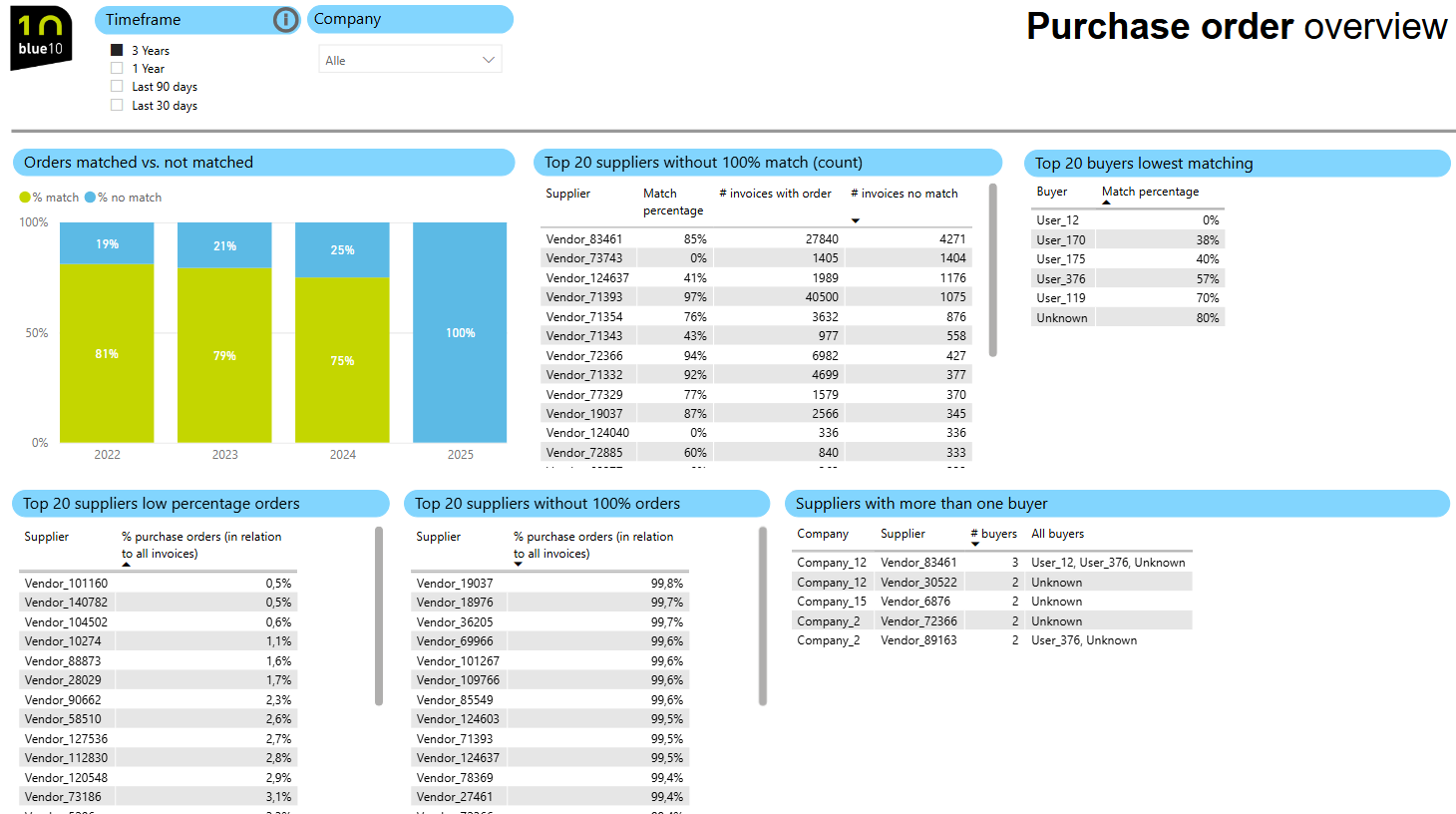
Orders matched vs. not matched
Provides an overview of the percentage of purchase orders that match the number of invoices per year. Select one administration at the top for a more specific insight.
A high matching percentage indicates a smooth process. A low percentage or a period with lower percentages indicates that your process requires extra attention.
Top 20 suppliers without 100% match (count)
This overview shows the 20 suppliers with the highest number of invoices for which the purchase order does not match the invoice 100% for the selected period and/or administration(s). You can see the matching percentage, the number of invoices with a purchase order and the number of invoices without a match.
Top 20 buyers lowest matching
This overview shows the 20 purchasers with the lowest matching percentage for the selected period and/or administration(s). If there are significant differences between the matching percentages and purchasers, it is advisable to review the working methods within the team. There may be a different way of ordering or data may often be missing.
Top 20 suppliers low percentage orders
This overview shows the 20 suppliers with the lowest percentage of total invoices linked to a purchase order for the selected period and/or administration(s). Is there a supplier for whom this is the case? If so, this may indicate ad hoc orders outside the agreed process.
Top 20 suppliers without 100% orders
This overview shows the 20 suppliers without 100% purchase orders for the selected period and/or administration(s). There may be various reasons for this, such as specific agreements, but also orders that have been processed incorrectly. This overview provides you with a starting point to determine whether the absence of purchase orders is correct or not.
Here you can see which suppliers sent an invoice without a purchase order being created by the purchaser.
Suppliers with more than one buyer
This overview shows how many purchasers are linked to each administration and supplier and which purchasers are involved (if available). If there are multiple purchasers per supplier, it is important to make clear agreements between them. This prevents different price agreements and delivery conditions.
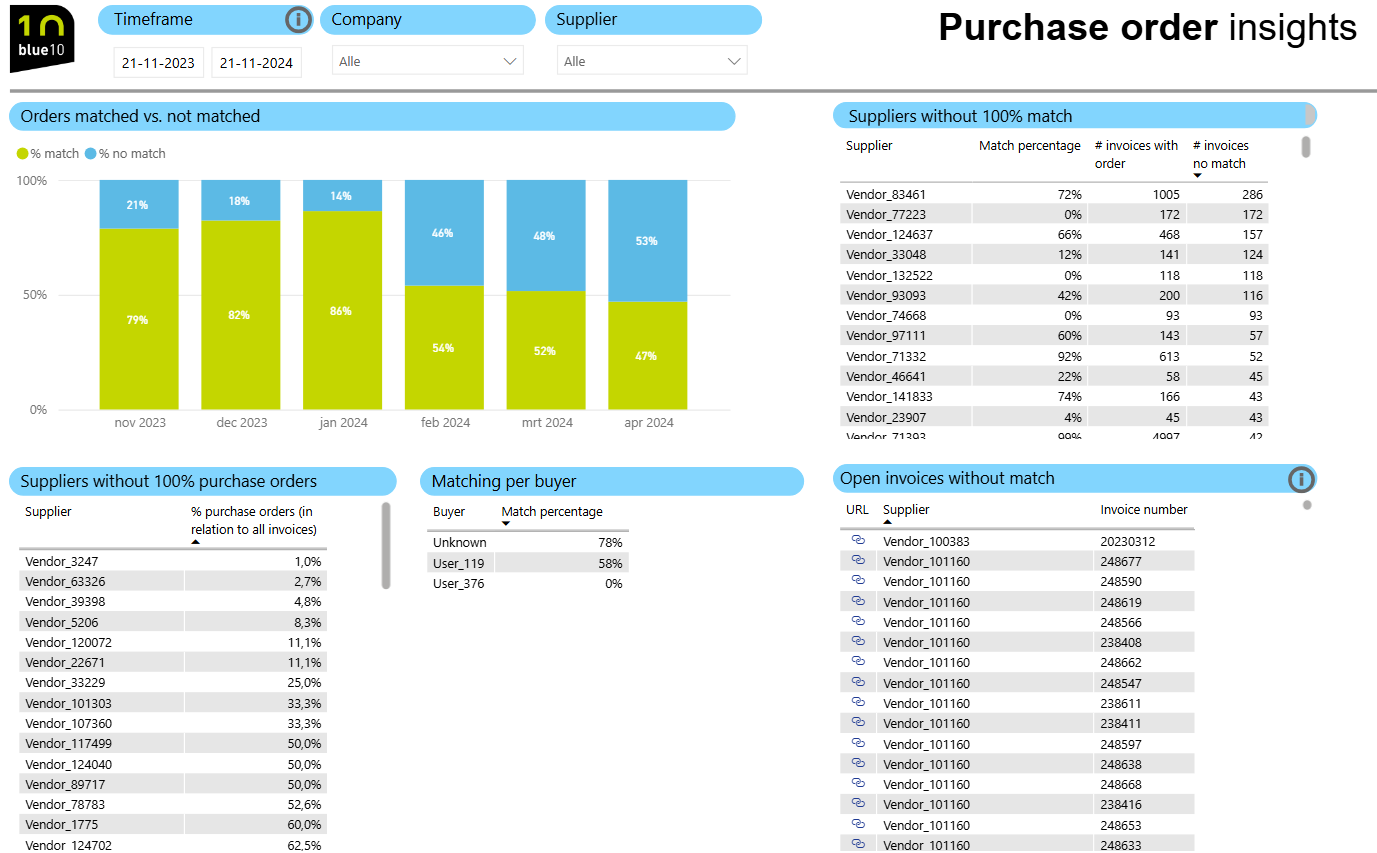
Purchase order insights
In addition to the overview page, where a number of fixed filters are set, this details page offers the option of flexible filtering based on a period of your choice. You can also zoom in at supplier level to gain more insight into the matching of purchase orders and open invoices without a match for this specific supplier(s).
Hover your cursor over the graph to see more information, such as the total invoice amount.
You will also find the following information, as described on the overview page:
- Orders matched vs. not matched
- Suppliers without a 100% match
- Suppliers without 100% purchase orders
- Matching percentage per buyer
- Open invoices without match
How do you access the Purchase Orders report?
The standard Blue10 Power BI reports are available as part of the Blue10 Enterprise subscription.
Other reports
In addition to the Purchase Orders Report, the standard Blue10 Power BI reports also include the Suppliers Report and the Process Processing & Auditing Report.
